 font inspector
The fastest way to identify a font on a website is a font inspector extension: click the text and read the family, size and weight. Without an extension, open your browser’s DevTools, select the text, and look at the Rendered Fonts section of the Computed tab. If the text is part of an image, neither works, and you need an image-based identifier instead.
First, check that it is real text
Every method on this page reads the page’s code, so it only works on live text. Try to select the words with your cursor. If individual letters highlight, it is live text and you can name the font exactly. If the whole block moves as one picture, it is an image, a canvas or a video frame, and you will need a different approach.
Logos are the usual trap. Most logos are SVG or PNG files, often custom lettering that was never a font at all. Headlines, navigation, buttons and body copy are almost always live text.
| Method | Best for | Time | Tells you the rendered font? |
|---|---|---|---|
| Font inspector extension | Everyday use, many sites | One click | Yes |
| Browser DevTools | Occasional checks, no installs | About a minute | Yes, in Chrome, Edge and Firefox |
| View the stylesheet | Finding font files and licenses | A few minutes | No, only what was declared |
| Image identifier | Text inside images and logos | A few minutes | A best guess |
Method 1: click the text with a font inspector
An inspector extension does the DevTools work for you and shows the answer next to the text. With Font Inspector it takes three steps.
- Add the extension, then refresh the page you want to inspect. Tabs that were open before installing need one reload.
- Click the toolbar icon and choose Pick text on page, or press
Alt + Shift + F(Option + Shift + Fon Mac). You can also right-click any text and choose Inspect Font. - Hover the text and click it. Press
↑or↓if you grabbed the wrong element and want its parent or child.Escleaves pick mode.
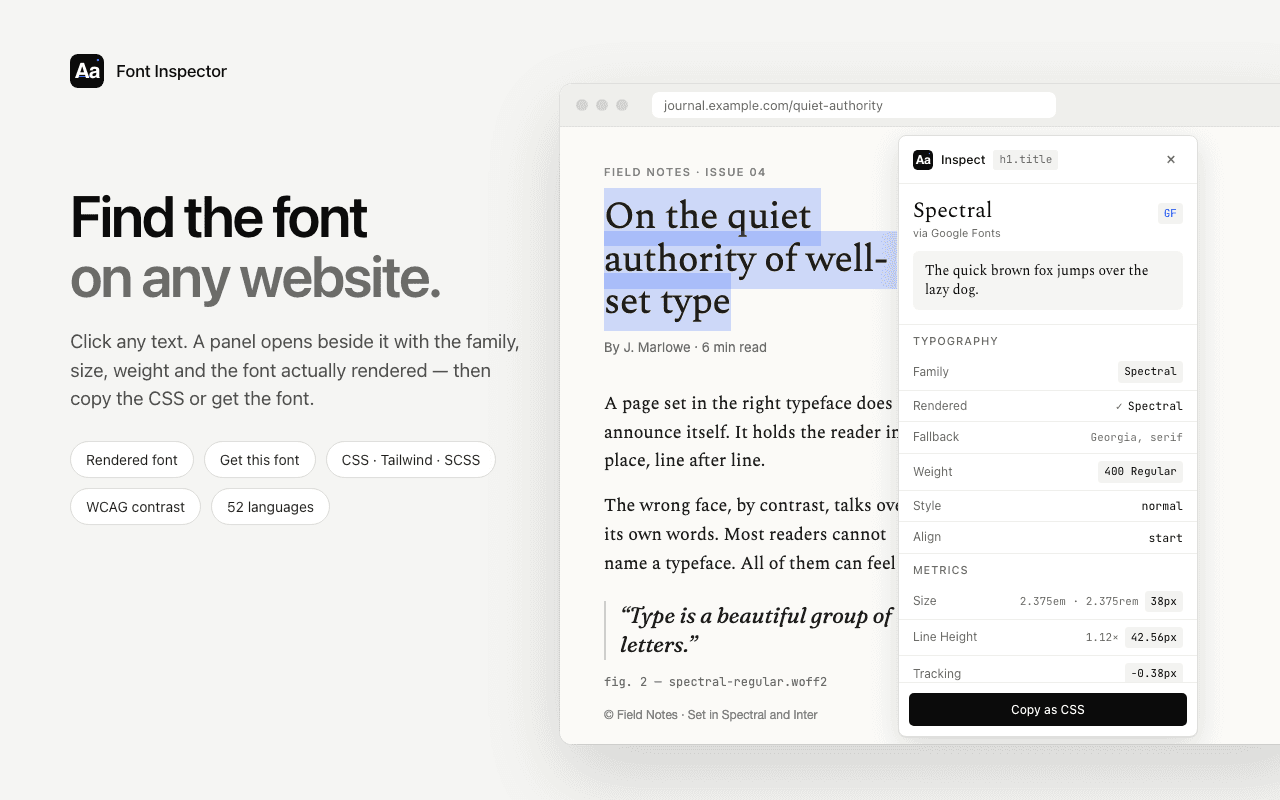
The panel shows the family and the full fallback stack, the font actually rendered, where it comes from (Google Fonts, Adobe Fonts, a self-hosted file or a font installed on your device), plus weight, size in px, em and rem, line height, letter spacing and colors. Click any value to copy it, or copy the whole style as CSS, Tailwind classes or SCSS variables.
Here is the idea in miniature. The sample below is real text on this page, and the panel reads its actual styles:
On the quiet authority of well-set type
A page set in the right typeface does not announce itself. It holds the reader in place, line after line.
Point at the heading, the paragraph or the button. The panel shows what Font Inspector would tell you.
Font Inspector is one of several extensions that work this way. If the name of the font is all you want, a lighter tool may be enough. See how Font Inspector compares with WhatFont, or the full rundown of font identifier extensions for Chrome.
Name any font in one click.
Font Inspector shows the family, the rendered font, size, weight and spacing of any live text. Free, no account, works inside embedded frames too.
Method 2: use your browser’s DevTools
Every desktop browser can tell you the font without installing anything. It takes a few more clicks, and the useful part is easy to miss.
Chrome, Edge, Brave and other Chromium browsers
- Right-click the text and choose Inspect. The Elements panel opens with that element selected.
- In the side pane, switch from Styles to the Computed tab.
- Find
font-familyto see the declared list. Then scroll to the very bottom of the Computed tab to the Rendered Fonts section. That is the font in use, along with whether it came from the network or from your computer.
font-family is a wish list. The browser uses the first font in it that is available and has the character. Rendered Fonts is what actually happened. When they differ, a fallback is showing. We explain this in declared vs rendered fonts.Firefox
Right-click, choose Inspect, then open the Fonts tab in the Inspector’s side pane. Firefox lists the fonts used by the selected element with a live preview, and has a section for all fonts on the page. For variable fonts it also shows sliders for each axis.
Safari
Turn on the Develop menu in Safari’s Advanced settings first. Then right-click, choose Inspect Element, and open the Font panel in the details sidebar of the Elements tab. It shows the primary font with its features and variation axes.
A full walkthrough with every panel is in how to find a font with Chrome DevTools.
Method 3: read the stylesheet and the network requests
This is the slow road, but it answers a different question: where do the font files come from? That matters when you want to license the same font.
- Open DevTools, go to the Network panel, filter by Font, and reload. Each row is a font file the page downloaded. The domain tells you a lot:
fonts.gstatic.commeans Google Fonts,use.typekit.netmeans Adobe Fonts, and the site’s own domain means self-hosted files. - In the Sources or Style Editor panel, search the CSS for
@font-face. Each rule maps a family name to its files, weights and styles. - The file name often contains the real family name even when the CSS name is an internal alias such as
brand-sans.
@font-face {
  font-family: "Brand Sans";            /* the name used in the CSS */
  src: url("/fonts/soehne-buch.woff2") format("woff2"); /* the real clue */
  font-weight: 400;
  font-display: swap;
}font-family, and the actual typeface hiding in the file name.Font Inspector’s Get this font section does this lookup for you: it links to the family on Google Fonts or Adobe Fonts, lists the files a self-hosted font loads, and suggests free look-alikes when the original is a paid typeface. More on that in how to get the font you found.
Method 4: when the text is an image
No code inspector can read a font out of pixels, and that includes Font Inspector. For logos, banners, social cards and screenshots, use an image-based identifier such as MyFonts WhatTheFont, Font Squirrel Matcherator or WhatFontIs.
- Crop tightly to one line of text in one style.
- Use the largest, sharpest version you can find. Straighten rotated text.
- Make sure letters are not touching. Distinctive letters help most: lowercase a, g, y, uppercase R, Q, and the numerals.
- Treat the result as a shortlist, then compare candidates by eye.
One shortcut: the same brand usually sets its website in the same typeface as its graphics. Inspect the live headline on the page first. It is exact, and it takes a second. There is more in identifying a font from an image.
Reading the result like a designer
A family name is only part of why text looks the way it does. Two sites can use the same typeface and feel nothing alike. Note these together:
- Weight. 400 and 500 look close in isolation and very different across a page.
- Size and line height. Body text at 18px with a 1.6 ratio reads differently from 15px at 1.4. See line height and letter spacing.
- Letter spacing. Large headlines are often tightened slightly. Small caps labels are usually opened up.
- Color and contrast. Dark gray on off-white is softer than pure black on white.
- The rest of the page. Headings and body copy are often different families. Use Fonts on this page to see every font a page uses at once.
When you want to try the combination yourself, the font pairing playground and the type scale calculator are a quick way to rebuild the feel with your own text.
You found it. Can you use it?
Knowing the name does not give you the right to use the font. Fonts are licensed software. Google Fonts are open source and free for commercial work. Adobe Fonts come with a Creative Cloud subscription. Most other professional typefaces need a web license from the foundry, usually priced by traffic.
Do not copy font files from another site’s server. If the original is out of budget, look for an open alternative with similar proportions. Font Inspector suggests free look-alikes for many popular paid fonts, and you can test them against your own content before deciding.
Questions & answers
How do I find out what font a website is using?
Click the text with a font inspector extension, or right-click the text, choose Inspect, open the Computed tab and scroll to Rendered Fonts. Both show the family that is actually being drawn.
Why does the font name in the CSS not match what I see?
The CSS lists fonts in order of preference. If the first one failed to load or is not installed, the browser draws the next available one. Check the rendered font, not just the declared font-family.
Can I identify a font on my phone?
Mobile browsers do not support extensions or DevTools well. The practical route is to open the same page on a desktop browser and inspect it there.
Can an extension identify fonts in images or logos?
No. Extensions read the page’s code, and an image has no font information in it. Use an image-based font identifier for logos, banners and screenshots.
Is it legal to use a font I found on another website?
Identifying a font is fine. Using it requires a license from its maker, unless it is an open source font such as those on Google Fonts. Never reuse font files taken from someone else’s site.
Related free tools: Font pairing playground · Type scale calculator
See it on real sites: What font does Framer use? · What font does Tailwind CSS use? · What font does Supabase use? · What font does Next.js use?
Sources and further reading: MDN: font-family · MDN: @font-face · Firefox DevTools: fonts