 font inspector
Look at where the font files come from. Files from fonts.gstatic.com mean Google Fonts, files from use.typekit.net mean Adobe Fonts, files from the site’s own domain or CDN mean self-hosted, and no font file at all means a system font installed on the device. The quickest manual check is the DevTools Network panel filtered by Font.
A web font can only come from four places
You like a typeface on a site and want to know if it is a free Google Font, part of Adobe Fonts, or something the company paid a foundry for. Or you run the site and need to know which third parties it calls. Both questions have the same answer: find out where the font file is served from.
There are only four possibilities, and each leaves a clear trace in the page.
| Source | What to look for | What it tells you |
|---|---|---|
| Google Fonts | A stylesheet from fonts.googleapis.com and font files from fonts.gstatic.com | Open source, free to use |
| Adobe Fonts | A stylesheet or script from use.typekit.net, plus a small request to p.typekit.net | Available with a Creative Cloud subscription |
| Self-hosted | Font files on the site’s own domain or its CDN | Could be a licensed commercial font, a custom font or a Google Font served locally |
| System font | No font file loads for that text | The font is installed on the visitor’s device |
A single page often mixes sources: a self-hosted brand font for headings, a Google Font for body copy and a system font in a cookie banner. Check the specific text you care about, not just the page as a whole. If you have not named the font yet, start with how to identify the font on any website.
Check 1: search the page source
The fastest look needs no DevTools. Right-click an empty part of the page and choose View page source, or press Ctrl + U (Cmd + Option + U in Chrome on a Mac). Then use your browser’s find command and search for these strings:
fonts.googleapis.comfinds the Google Fonts stylesheet link. The family names are readable in the URL.typekitfinds an Adobe Fonts embed. Adobe Fonts used to be called Typekit, and the domain kept the name..woff2or@font-facefinds fonts declared directly in the page.
<!-- Google Fonts -->
<link href="https://fonts.googleapis.com/css2?family=Inter:wght@400;700&display=swap" rel="stylesheet">

<!-- Adobe Fonts -->
<link rel="stylesheet" href="https://use.typekit.net/abc1def.css"><head>. The Adobe project ID here is a placeholder.This check is quick but it misses things. Many sites load fonts from inside a CSS file, with an @import or an @font-face rule, or add them with JavaScript. None of that appears in the HTML source. A Google Fonts URL in the source also only proves the stylesheet was requested, not that any text uses the font. If the search comes up empty, move to the Network panel.
Check 2: the Network panel, filtered by Font
This is the reliable method, because it shows what the browser really downloaded, however the font was referenced.
- Open DevTools (right-click, Inspect) and switch to the Network panel.
- Click the Font filter in the row of resource types.
- Reload the page with the panel open. Each row that appears is one font file.
- Read the domain of each row. Hover the file name or click the row to see its full URL. You can also right-click the table header and turn on the Domain column.
| Domain of the font file | Source |
|---|---|
fonts.gstatic.com | Google Fonts |
use.typekit.net | Adobe Fonts |
| The site’s own domain, or a CDN it uses for its other assets | Self-hosted |
| Nothing listed | System fonts only, or fonts embedded in the CSS as data: URLs |
Two things can confuse the list. Browsers only download a web font when some text on the page needs it, so a family declared in the CSS but never used will not show up. And more fonts can load as you scroll or open menus, so interact with the page before you decide the list is complete. Firefox and Safari have the same panel with a font filter. The Chrome steps, with every panel named, are in how to find a font with Chrome DevTools, and the other browsers are covered in finding fonts in Firefox, Safari and Edge.
Check 3: Rendered Fonts, local file or network resource
The Network panel tells you about the page. To check one piece of text, use the Elements panel in Chrome or Edge. Right-click the text, choose Inspect, open the Computed tab and scroll to the bottom. The Rendered Fonts section names the font that is actually being drawn and says whether it is a network resource or a local file.
- Network resource means the browser downloaded it. It is a web font, so match the name to a row in the Network panel to see which domain served it.
- Local file means the font came from your own device. Either the site asks for a system font on purpose, or the web font failed and you are looking at a fallback.
To tell those two apart, compare the rendered name with the first name in font-family. If the CSS asks for system-ui or -apple-system and you see a local file, that is by design. If the CSS asks for a brand font and you see Arial as a local file, the web font did not load. We explain the mechanics in CSS font stacks and fallbacks.
Self-hosted fonts and the other providers
Self-hosted does not mean paid
Google Fonts are open source, so anyone may download the files and serve them from their own server. Many sites do this for speed or privacy. In the Network panel those fonts look exactly like a licensed commercial font: files on the site’s own domain. The file name and the family name are your clues. Search the family name on fonts.google.com. If it is there, it is a Google Font that was self-hosted, and you can use it for free too.
If the name in the CSS is an alias such as brand-sans, read the font file name instead. It often contains the real family name. When the family is not on Google Fonts or Adobe Fonts, it is most likely licensed from a foundry or made for the brand. What to do next is in how to get the font you found.
Other hosted services you can spot by domain
| Domain | Service | Notes |
|---|---|---|
fonts.bunny.net | Bunny Fonts | An EU-based host of open source fonts, built as a drop-in replacement for the Google Fonts CSS API |
api.fontshare.com | Fontshare | A free font service from Indian Type Foundry |
fast.fonts.net | Monotype web fonts (fonts.com) | Hosted commercial fonts |
cloud.typography.com | Cloud.typography by Hoefler&Co | A hosted service for Hoefler&Co typefaces. It is closed to new subscribers, so you mostly see it on older sites |
This list is not complete. If you meet a domain you do not recognize, open it in a new tab or search for it. Font services are rarely shy about who they are.
The one-click version: source labels in Font Inspector
Font Inspector runs these checks for you. Click the toolbar icon, choose Pick text on page (or press Alt + Shift + F, Option + Shift + F on Mac) and click any text. For each family, the panel labels the source as one of four: Google Fonts, Adobe Fonts, self-hosted web font, or system font installed on the device. It also shows the font actually rendered, with a fallback flag when the declared font is not the one being drawn, so you do not mistake a failed web font for a deliberate system font.
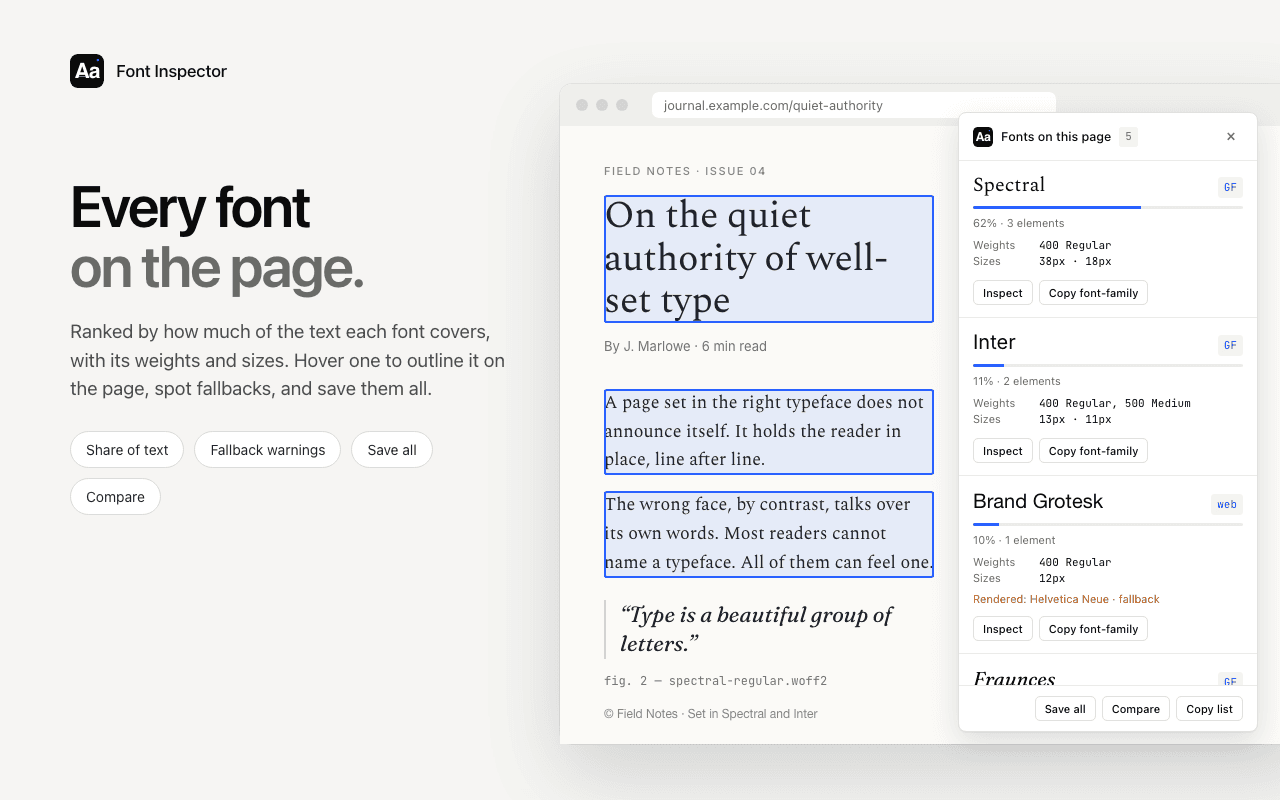
For a whole page, open Fonts on this page. It lists every family ranked by share of text, with weights, sizes and fallback warnings, and you can inspect each one to see its source. More on that view in how to see all fonts on a page. From any family, the Get this font section opens the matching page on Google Fonts or Adobe Fonts, or lists the files a self-hosted font loads.
The honest limits: the extension sorts fonts into those four groups. A font from one of the smaller services in the table above may not get its own label, so check the domain of the font files that Get this font lists. It cannot tell you which license a site holds. And a self-hosted label does not rule out a Google Font served locally, so the family name check on fonts.google.com still applies.
See where every font comes from.
Font Inspector labels each family as Google Fonts, Adobe Fonts, self-hosted or system, right next to the text you clicked. Free, no account.
Why the source matters
Licensing
The source is the shortest path to the question “can I use this too?”. A Google Font is open source and free for commercial work. An Adobe Font comes with a Creative Cloud subscription and has to load through Adobe’s embed code. A self-hosted commercial font needs its own web license from the foundry. A system font cannot be redistributed at all. The details are in font licensing explained and are Google Fonts free for commercial use. This is general information, not legal advice.
Performance
A hosted font service means the browser has to connect to another domain before text can appear in the right typeface. Self-hosted files travel over the connection the page already has, and you control caching, subsetting and preloading yourself. System fonts cost nothing to load because nothing is downloaded. If you audit your own site and find three providers serving five families, that is a good place to start trimming.
Privacy
Every request to a third-party font host shares the visitor’s IP address with that host. In January 2022 a regional court in Munich ruled against a website operator who had embedded Google Fonts from Google’s servers, finding that passing the visitor’s IP address to Google without consent had no legal basis under the GDPR. If this applies to you, the Network panel check above is how you confirm that no font requests leave your domain, and your own legal adviser is the right person to ask about the rest.
Questions & answers
How do I check if a website uses Google Fonts?
Open DevTools, go to the Network panel, filter by Font and reload. Font files from fonts.gstatic.com, or a stylesheet from fonts.googleapis.com, mean the site loads Google Fonts from Google’s servers.
How can I tell if a font is a Google Font?
Search the family name on fonts.google.com. If it is listed, it is a Google Font, even when the site serves the files from its own domain instead of Google’s.
How do I detect Adobe Fonts (Typekit) on a website?
Look for use.typekit.net in the page source or in the Network panel. Adobe Fonts was formerly called Typekit, and its embed code and font files still use that domain.
What does it mean when no font files load at all?
The page is using system fonts that are already installed on the device, such as SF Pro on a Mac or Segoe UI on Windows. In Chrome, Rendered Fonts will describe the font as a local file.
Is a self-hosted font always a paid font?
No. Open source fonts, including everything on Google Fonts, can be downloaded and self-hosted legally. Check the family name before assuming a license is needed.
Related free tools: Font pairing playground
See it on real sites: What font does Webflow use? · What font does Framer use? · What font does Tailwind CSS use? · What font does Supabase use?
Sources and further reading: Google Fonts: frequently asked questions · Google Fonts Knowledge: self-hosting web fonts · Adobe Fonts: web fonts from Adobe Fonts · Chrome for Developers: Network features reference · Bunny Fonts: about · MDN: @font-face