 font inspector
CSS Peeper is a general design inspector. It covers colors, palettes, images and icons, typography and element CSS, with a free plan and paid plans for the advanced features. Choose it when you need the whole visual layer of a site, especially colors and assets. Font Inspector covers typography only, in more depth: the rendered font with fallback flags, font source, every font on the page, copy as CSS, Tailwind or SCSS, and a local library with compare and export. It is free with no account. Many designers will be well served by keeping both.
The short answer
This is less a head-to-head than a question of scope. CSS Peeper looks at a page the way a designer looks at a mockup: what are the colors, where are the images, what do the buttons look like, what type is in use. Font Inspector looks only at the text, and asks more questions about it.
So the honest answer to “which one?” depends on what you came to the page for. If you want a site’s palette and its SVG icons, Font Inspector cannot help you at all. If you want to know why a headline is rendering in Arial when the CSS says something else, a type-focused tool is the shorter path.
What CSS Peeper does, according to its own pages
We read the Chrome Web Store listing, the official site and its pricing page on September 20, 2026. Here is what they state.
Free core features
- Inspect design properties. Point at an element and click to see its properties, without opening the code.
- Colors. Browse the colors a site uses, check contrast, and export a palette to a design tool.
- Typography. Explore the typography across a site, including font pairings and the most relevant text properties.
- Assets. Browse and download the images, icons and graphics a site uses.
Premium features
- Preview and copy the CSS of any element.
- Browse text styles in use, preview the typography hierarchy, and locate each instance of a text style.
- Browse colors by semantic group such as typography, background and border, and inspect individual color instances, including class and design token.
- Explore gradients color by color.
- A contrast scanner that reports contrast issues across the page.
- Smart Inspector, which adds details such as color contrast, shadows and elevation. The pricing page limits the free plan to three smart inspections a day.
- Sidebar mode, which frees up the page’s viewport.
Pricing, account and version
The pricing page lists three plans: a free plan described as “free forever”, and two paid subscriptions called Professional and Ultra, billed monthly or yearly. Paid plans start with a 7-day trial that asks for a card, and payments run through Stripe. The Chrome Web Store listing confirms that the extension offers in-app purchases. The free plan’s button on the pricing page reads “Sign up for free”. Prices and promotions change, so check the vendor’s pricing page for current numbers.
The listing shows version 1.2.3, with its last update as September 11, 2026. Its privacy section discloses that the extension handles personally identifiable information, authentication information, user activity and website content, and that data is not sold to third parties. The official site links only to the Chrome Web Store. Its FAQ says a subscription is shared between browsers, but does not list them.
Feature comparison
Where a cell says “not mentioned”, the vendor’s pages do not describe the feature. That is not proof it is missing.
| CSS Peeper | Font Inspector | |
|---|---|---|
| Scope | Whole design: colors, assets, typography, element CSS | Typography only |
| Font family, size, weight and text properties | Yes | Yes, with size in px, em and rem, line height as a ratio, letter spacing |
| Rendered font with fallback flag | Not mentioned | Yes |
| Font source (Google, Adobe, self-hosted, system) | Not mentioned | Yes |
| Typography across the whole page | Yes. Hierarchy and locating instances are premium | Yes, ranked by share of text, with weights, sizes and fallback warnings |
| Copy styles as code | Copy element CSS, premium | Copy as CSS, Tailwind classes or SCSS variables, free |
| Site color palette and export | Yes | No. Shows text and background color of the inspected text only |
| Contrast | Contrast check, plus a premium page-wide scanner | WCAG contrast check for the inspected text |
| Images, icons and SVG export | Yes | No |
| Shadows, elevation, gradients | Yes, listed among the premium features | No |
| Variable font axes and OpenType features | Not mentioned | Yes, when the page uses them |
| Saved library with compare and export | Not mentioned | Yes, stored locally |
| Price | Free plan, two paid plans, in-app purchases | Free |
| Account | Sign-up offered for the free plan, subscriptions for paid plans | None |
When CSS Peeper is the better choice
- You want colors. A full palette of the site, exportable to a design tool, is something Font Inspector does not attempt. It only reports the text color and background color of the text you clicked.
- You want assets. Browsing and exporting a site’s images, icons and SVGs in one place is a big time saver for redesigns and audits. Font Inspector has nothing like it.
- You inspect whole components. Buttons, cards and navigation bars are more than their type. Shadows, elevation, gradients and element CSS belong to a general inspector.
- You audit accessibility across a page. A page-wide contrast scanner finds problems you did not think to click on. Font Inspector checks contrast one text element at a time. Our guide to checking text contrast on a website covers the manual route too.
- You are happy to pay for depth. If a design inspector is a daily tool for you, a subscription for the advanced features can be good value.
When Font Inspector is the better choice
- Type is the question. You get the declared stack, the font actually rendered, and a flag when a fallback is showing. The difference matters more often than you would think, as CSS font stacks and fallbacks explains.
- You need the source of the font. Each family is labeled as Google Fonts, Adobe Fonts, self-hosted or a system font. Get this font then links to the provider, or lists the files of a self-hosted font with a ready
@font-facerule. See how to get the font from a website. - You write Tailwind or SCSS. Copying a style as Tailwind classes or SCSS variables, not only as CSS, is built in and free. More in copy typography as CSS or Tailwind.
- You want a page-wide type audit at no cost. Fonts on this page ranks every family by share of text with weights, sizes and fallback warnings, and outlines where each is used when you hover it.
- You keep a font library. Inspections are saved locally. Compare up to four fonts with the same sample text, and export as JSON, CSS variables or design tokens.
- You want no account and no plan to think about. Everything in Font Inspector is free, and nothing is synced to a server.
When the question is about type, ask a type tool.
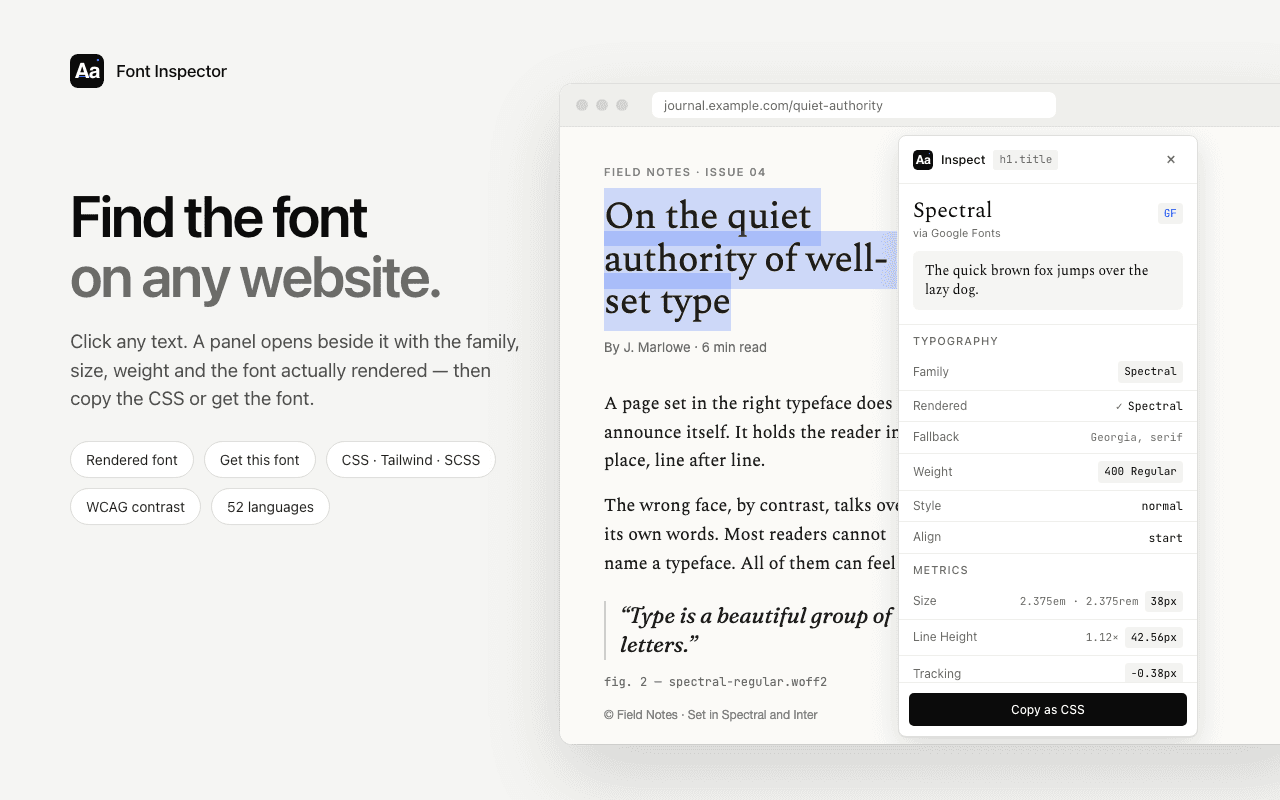
Font Inspector shows the rendered font, its source and the full spec, lists every font on the page, and copies styles as CSS, Tailwind or SCSS. Free, no account.
Font Inspector as a CSS Peeper alternative
If you are searching for a CSS Peeper alternative, the honest answer depends on what you used CSS Peeper for.
What carries over
- Typography and element CSS. Font Inspector covers these in more depth: the rendered font with fallback flags, the source of each family, size in px, em and rem, line height, spacing, variable axes and a contrast check.
- Copying styles. As CSS, and also as Tailwind classes or SCSS variables, all free.
- A page-wide audit. Every font on the page, ranked by share of text.
What you give up
- Colors and palettes. Font Inspector reports only the text and background color of the inspected text, not a site palette.
- Images, icons and assets. Not covered at all. Keep CSS Peeper for those.
How to try both side by side
Because the two overlap only on typography, test them on that, then decide whether you need the rest of what CSS Peeper offers.
- Install both and refresh the page you want to inspect.
- Click the same headline and the same paragraph with each tool. Compare what you learn about family, size, weight and line height.
- Open each tool’s page-wide typography view. Note which details sit behind a paid plan in CSS Peeper and whether you would use them.
- Copy a style into your editor from each. If you work in Tailwind or SCSS, check how much rewriting each result needs.
- Now do a non-type task in CSS Peeper: export the palette, or download an icon. If that is part of your week, keep it installed whatever you decide about type.
Keeping both is a reasonable outcome. They answer different questions and do not get in each other’s way. For more options, see the best font identifier extensions compared.
Questions & answers
What is a good CSS Peeper alternative for fonts?
For typography, Font Inspector is a free alternative. It shows the rendered font with fallback flags, the font source, every font on the page, and copies styles as CSS, Tailwind or SCSS. It does not inspect color palettes, images or other assets.
Is CSS Peeper free?
It has a free plan that its pricing page calls free forever, with core inspection, asset export and palette export. Advanced features sit in two paid plans, Professional and Ultra, which start with a 7-day trial.
Does Font Inspector extract colors and images like CSS Peeper?
No. Font Inspector reports the text color and background color of the text you inspect, with a WCAG contrast check. It does not build a site palette or export images, icons or SVGs.
Can I use CSS Peeper and Font Inspector together?
Yes. They are separate extensions and do not conflict. A sensible split is CSS Peeper for colors and assets, and Font Inspector for type.
Related free tools: Website font checker · Type scale calculator
See it on real sites: What font does Figma use? · What font does Canva use? · What font does Shopify use? · What font does Slack use?
Sources and further reading: CSS Peeper on the Chrome Web Store · CSS Peeper: official site · CSS Peeper: pricing