 font inspector
Click the text with a font inspector, or right-click it, choose Inspect and read Rendered Fonts at the bottom of the Computed tab. Then look at the font file’s address: a path under /wp-content/themes/ means the theme ships the font, /wp-content/plugins/ points to a plugin, and fonts.gstatic.com means Google Fonts. On your own site, block themes set fonts under Appearance, Editor, Styles, Typography, and the Font Library lets you install or upload fonts.
Check that the site runs on WordPress
You found a blog or a business site with type you like, and you suspect it is WordPress. Confirming that takes a few seconds and pays off later, because on WordPress the font’s address also tells you which theme or plugin supplies it.
- Right-click the page, choose View page source and search for
wp-content. Paths such as/wp-content/themes/and/wp-content/plugins/are the WordPress signature. - Look at the folder name right after
/wp-content/themes/. That is the theme’s folder, and usually its name. A folder that ends in-childis a child theme built on top of another one. - Some sites also carry a
generatormeta tag in the source that says WordPress and a version number. Many sites remove it, so its absence proves nothing.
Make sure the words are live text too. If you can select single letters with your cursor, you can name the font exactly. If the headline is part of a picture, use an image-based identifier instead.
Identify the font
Every desktop browser can do this with no installs. In Chrome, Edge or Brave:
- Right-click the text and choose Inspect.
- In the side pane of the Elements panel, open the Computed tab and find
font-family. This is the list the theme declared, in order of preference. - Scroll to the bottom of the Computed tab. Rendered Fonts names the font the browser is really drawing and says whether it is a network resource or a local file on your computer.
- Check a heading, a paragraph and a button. WordPress themes commonly pair one family for headings with another for body text.
In Firefox, the Inspector has a Fonts tab that shows the fonts used by the selected element and a section for all fonts on the page. The complete walkthrough is in how to identify fonts on a website.
The one-click route
With Font Inspector, press Alt + Shift + F (Option + Shift + F on Mac) or click the toolbar icon and choose Pick text on page, then click the text. The panel shows the family and the full fallback stack, the font actually rendered, its source, the weight, the size in px, em and rem, the line height and the letter spacing. Fonts on this page lists every family on the page ranked by share of text, which is the quickest way to see all the fonts a page uses.
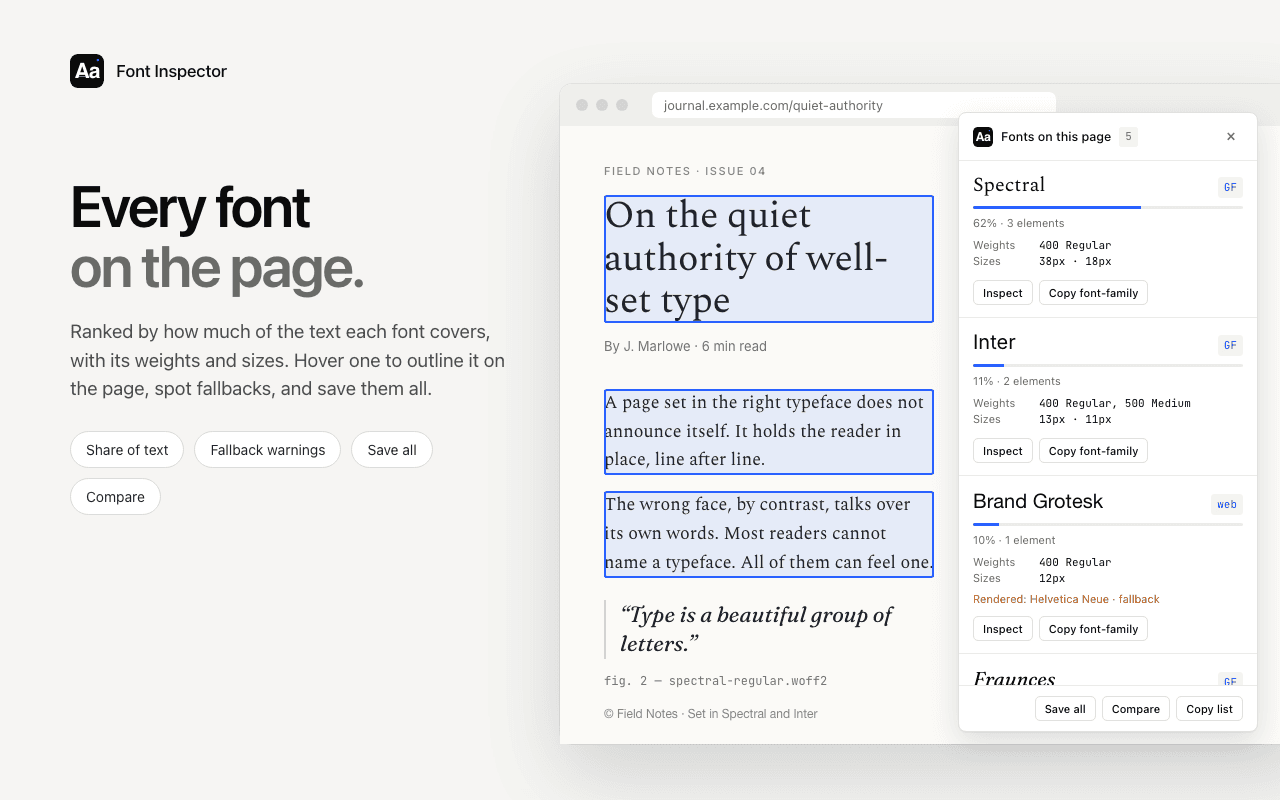
Find the font and where it is hosted.
Font Inspector labels each family as Google Fonts, Adobe Fonts, a self-hosted web font or a system font, and Get this font lists the files a self-hosted font loads. Free, no account.
Theme, plugin or Google Fonts: where the font comes from
On WordPress a font can arrive from several places, and the source decides how you get it onto your own site. Open DevTools, go to the Network panel, filter by Font and reload. Then read the address of each font file.
| Font file address | Source | What it means for you |
|---|---|---|
/wp-content/themes/ and the theme folder | Bundled with the theme | Installing the same theme gives you the font. Check the theme’s license notes for the font. |
/wp-content/plugins/ and a plugin folder | A page builder or font plugin | The folder name tells you which plugin. The font was picked in that plugin’s settings. |
A fonts folder elsewhere under /wp-content/ | Added by the site owner, often through the Font Library | Could be a Google Font hosted locally or a licensed upload. The family name settles it. |
fonts.gstatic.com | Google Fonts, loaded from Google | Free and open source. You can install it on your site in a minute. |
use.typekit.net | Adobe Fonts | Needs a Creative Cloud subscription and a web project. |
A family name such as Inter, Lora or Montserrat is a Google Font wherever the file sits. A name you cannot find on Google Fonts is usually a commercial typeface. CSS names can also be aliases, so look at the file name too. The checks are covered in is it Google Fonts or Adobe Fonts?. If you would rather not open DevTools, paste the address into our website font checker to see the declared fonts and where the files are hosted.
Change fonts in a block theme
Block themes are the current kind of WordPress theme. You can tell you have one if your admin menu shows Appearance, then Editor. Fonts are set site-wide in Styles.
- Go to Appearance, then Editor.
- Open the Styles panel. WordPress marks it with a half-shaded circle icon near the top right of the Site Editor.
- Click Typography. Choose the element you want to change: text, links, headings or buttons.
- Pick the font, then set size, appearance, line height and letter spacing. Headings can be set for all levels at once or for H1 to H6 separately.
- Save. The change applies to the whole site, except blocks where you set a font by hand.
Add fonts with the Font Library
The Font Library arrived in WordPress 6.5. It manages the fonts your site can use, so you are not limited to what the theme ships. WordPress’s documentation says that from version 7.0 it lives in the admin menu under Appearance, then Fonts. On earlier versions you reach it from the Typography panel in Styles, through the manage fonts control next to the font list.
- Library shows the fonts installed on your site, including the theme’s own. Tick or clear the checkboxes to make single variants available, then click Update.
- Upload takes font files from your computer. The supported formats are
.ttf,.otf,.woffand.woff2. - Install Fonts lets you browse Google Fonts. You first allow your site to connect to Google Fonts, then choose a family, select the variants you need and install them.
Install only the weights you identified on the other site. Two or three variants are usually enough, and every extra file is more for your visitors to download.
Classic themes and page builders
Classic themes do not use the Site Editor. Their settings live in the Customizer, which opens from Appearance, then Customize, and shows a live preview while you change things. Where the font controls sit depends entirely on the theme. Look for a section about typography, fonts or general styling. Some themes put their options on a separate theme options screen in the admin menu instead.
WordPress’s documentation states that from version 7.0 the Font Library is available for classic themes as well as block themes. Installing a font there hosts it on your site. Whether your theme’s own font menus then list it depends on the theme, so check the theme’s documentation. If the theme offers no font control at all, a small CSS rule in the Customizer’s Additional CSS section does the job.
/* Appearance, Customize, Additional CSS */
body {
  font-family: "Lora", Georgia, serif;
}

h1, h2, h3 {
  font-family: "Inter", Arial, sans-serif;
  font-weight: 600;
}Page builders such as Elementor, Divi and Beaver Builder bring their own typography settings, and those usually override the theme. Look for the builder’s site-wide or global settings first and set the default heading and body fonts there, so you do not have to restyle every widget. Most builders include a Google Fonts list, and several have their own custom font upload, sometimes only in the paid version. When a font you set in the theme does not show up, a builder setting is the usual reason.
Add a custom font you have licensed
If the font you found is a commercial typeface, buy a license that covers web use first. Foundries usually deliver .woff2 files for the web. Then:
- Open the Font Library and go to the Upload tab.
- Upload one file per weight and style, or a single variable font file.
- Back in the Library tab, confirm the variants are active.
- In Styles, Typography, select the new family for text or headings.
WordPress reminds you on the Upload tab to make sure you have permission to use and distribute the font. Take that seriously: the files will be publicly reachable on your server, which is exactly what a web license permits and a desktop license does not. The differences are explained in font licensing explained.
On an older WordPress version with a classic theme, the manual route still works. Put the files on your server, write an @font-face rule for each one and add it to a child theme’s stylesheet or to Additional CSS. Our @font-face generator writes the rules, and the font stack builder helps with fallbacks. If the original font is out of budget, the free alternatives pages list open look-alikes for popular paid fonts. They are similar, not identical.
Host Google Fonts locally for privacy
When a site loads fonts from Google’s servers, each visitor’s browser contacts Google and sends its IP address. For sites with visitors in the EU that has been a legal concern, and the simple fix is to serve the files from your own domain. The background is in Google Fonts, GDPR and self-hosting.
The Font Library already works this way. According to WordPress’s documentation, when you install a Google Font through the Install Fonts tab, WordPress downloads the selected files and hosts them on your site instead of loading them from Google. The only contact with Google happens in your admin while you browse the list.
Older themes and some plugins still link to Google directly. To check your own site, open it in a private window, open the Network panel, filter by Font and reload. Any row from fonts.gstatic.com is a font still coming from Google. Find which theme or plugin setting adds it, switch that off, and install the same family through the Font Library. Google Fonts are open source, so hosting them yourself is allowed. See are Google Fonts free for commercial use?.
Questions & answers
How do I find out what font a WordPress theme uses?
Open a site that uses the theme, or the theme’s demo, right-click the text and choose Inspect. In the Computed tab, scroll to Rendered Fonts. A font inspector extension shows the same answer with one click.
How can I tell which WordPress theme a site is using?
View the page source and search for /wp-content/themes/. The folder name that follows is the theme’s folder, which is usually the theme’s name. A child theme has its own folder, often ending in -child.
Where do I change fonts in WordPress?
In a block theme, go to Appearance, Editor, open Styles and click Typography. In a classic theme, go to Appearance, Customize and look for the theme’s typography options. Page builders have their own global font settings.
What is the WordPress Font Library?
It is a built-in font manager introduced in WordPress 6.5. It lets you upload font files, install Google Fonts that are then hosted on your own site, and switch single variants on or off.
Does WordPress load Google Fonts from Google’s servers?
Fonts installed through the Font Library are downloaded and served from your own site. Some older themes and plugins still load fonts from Google directly, which you can spot in the Network panel as requests to fonts.gstatic.com.
Related free tools: Website font checker · @font-face generator · CSS font stack builder
See it on real sites: What font does TikTok use? · What font does LinkedIn use? · What font does Instagram use? · What font does Medium use?
Sources and further reading: WordPress documentation: The Font Library · WordPress documentation: Styles overview · WordPress documentation: Customizer · Make WordPress Core: New feature, Font Library · MDN: @font-face