 font inspector
FONTS ON THIS PAGE
Every font on the page, in one list
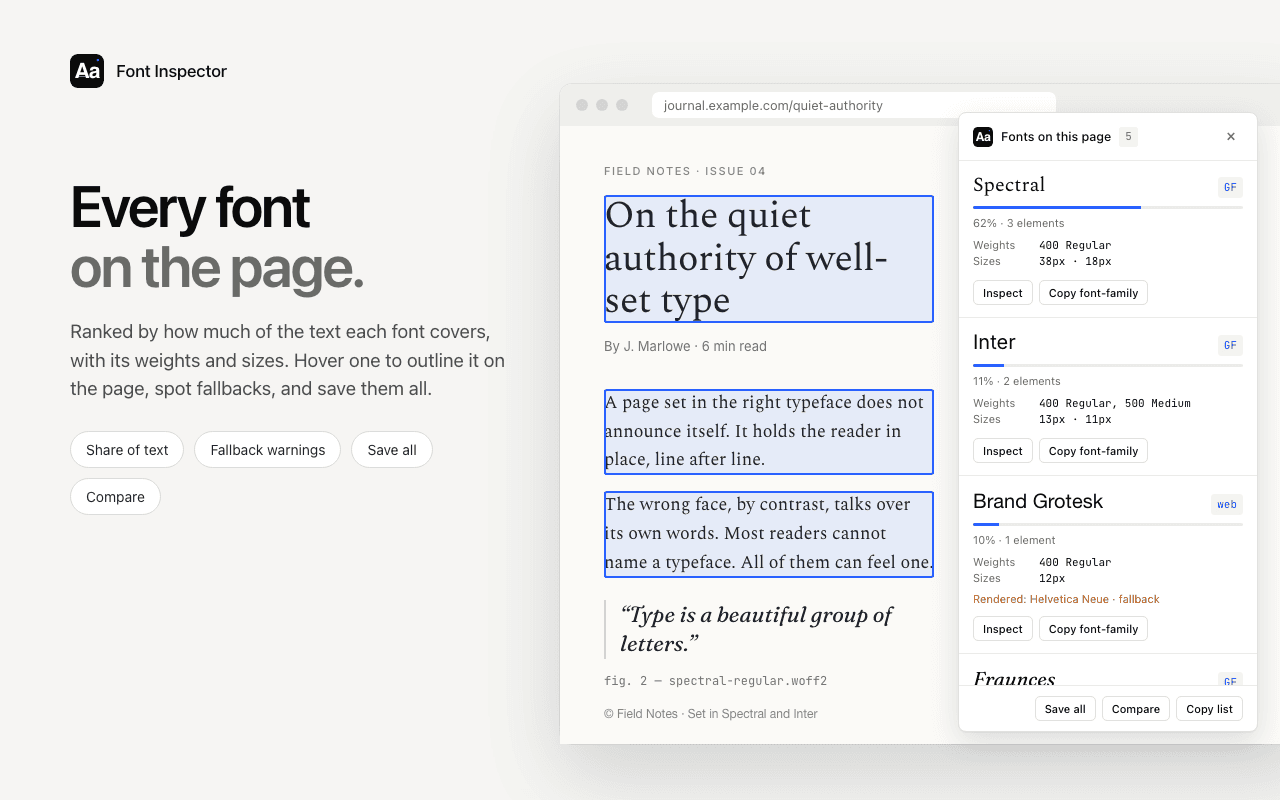
Clicking one headline tells you about one headline. Fonts on this page shows the whole typographic system at once: which families a site really uses, how much of the text each one sets, and in which weights and sizes.
What it does
- Every family on the page, ranked by share of text, so you can tell the body face from a font used once in the footer.
- The weights and sizes in use for each family, which is the page’s real type scale.
- A fallback warning when a declared font is not the one being drawn.
- Hover a family to outline every place it appears on the page.
- Inspect a family, save them all to your library, compare them side by side, or copy the list.
How to use it
- Open the page and click the Font Inspector icon.
- Choose Fonts on this page.
- Hover a family to see where it is used, or click Inspect for full details.
Good to know
- Share is measured in characters of text, not in visual area, so a huge headline counts less than a long paragraph.
- On very large pages only part of the text is scanned, and the panel tells you when that happens.
- Text inside images, canvas and video has no font information and is not counted.
Go deeper
Questions & answers
How do I see all the fonts a website uses?
Install Font Inspector, open the page, click the toolbar icon and choose Fonts on this page. You get every family ranked by how much text it sets, with weights and sizes.
How many fonts should a website use?
There is no fixed rule, but most well-built sites use one to three families. Every extra family and weight is usually another file to download.
Does the list include system fonts?
Yes. It reports the fonts actually rendered, so system fonts and fallbacks appear too, which a list of downloaded font files would miss.