 font inspector
From a font you like to code you can paste
Naming a font is half the job. The look also depends on the size, weight, line height, letter spacing and color. Font Inspector reads all of them from the live page and hands them to you in the format your project uses.
What it does
- Click any value to copy just that value: a size, a weight, a color.
- Copy the whole style as CSS, as Tailwind classes, or as SCSS variables.
- Size in px, em and rem, and line height both in px and as a unitless ratio.
- Colors in HEX, RGB, HSL or OKLCH, with a WCAG contrast check against the background.
- The element’s CSS selector path, when you need to find it in the stylesheet.
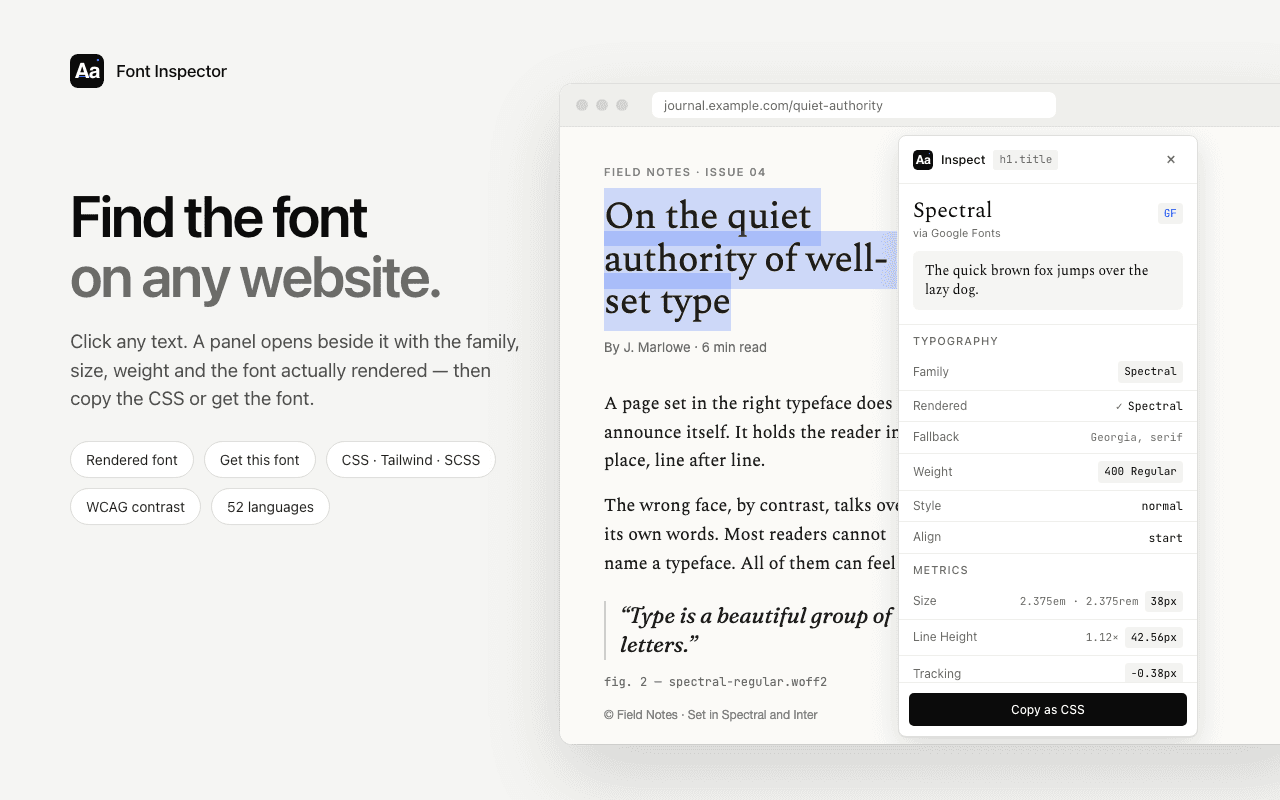
On the quiet authority of well-set type
A page set in the right typeface does not announce itself. It holds the reader in place, line after line.
Point at the heading, the paragraph or the button. The panel shows what Font Inspector would tell you.
How to use it
- Click the Font Inspector icon and choose Pick text on page, or press
Alt + Shift + F. - Click the text whose style you want.
- Click a value to copy it, or choose the format and copy the whole style.
Good to know
- Copied styles describe the text. They do not load or license the font itself.
- Values are computed for your current window size. Responsive sites use other values at other widths.
Go deeper
Questions & answers
Can I copy the CSS of text from any website?
Yes. Font Inspector reads the computed styles of any live text and copies them as CSS, Tailwind classes or SCSS variables.
Is it legal to copy font styles from a website?
Measurements such as sizes, weights and spacing are fine to learn from. The font file itself is licensed software, so get the font from its maker or use a free alternative.
Does it work with Tailwind?
Yes. The Tailwind output uses utility classes with exact values, which you can map to your theme tokens afterwards.