 font inspector
Typography tokens are named values for font family, size, weight, line height and letter spacing. To derive them from a live site, list every family, size and weight actually in use, merge near-duplicates into a small scale, name the values in two layers (primitive and semantic), and publish them as CSS custom properties or as a JSON file in the Design Tokens Community Group format.
What typography tokens are
Most sites that have been alive for a few years have the same problem. Nobody decided to use eleven font sizes. They accumulated: a 15px here, a 0.9rem there, a one-off 22px for a campaign page. The design looks slightly uneven and nobody can say why.
Design tokens are the fix. A token is a named design decision stored as data: a name, a value and a type. Instead of font-size: 18px scattered through the code, you have one value called something like font.size.body and everything refers to it. For typography, five properties do nearly all the work.
| Token kind | CSS property | Typical values |
|---|---|---|
| Font family | font-family | A family name plus its fallback stack |
| Font size | font-size | A short scale, for example 13, 16, 20, 25, 31, 39 px |
| Font weight | font-weight | Two to four weights, for example 400, 600, 700 |
| Line height | line-height | Unitless ratios, for example 1.1, 1.3, 1.6 |
| Letter spacing | letter-spacing | Small adjustments, often negative for large headings |
This guide walks the path from a site that already exists to a clean token file. It works for your own site before a redesign, and for a reference site whose typographic system you want to understand. Studying someone’s scale is fine. Their fonts still need a license, as font licensing explained sets out.
Step 1: audit what the site really uses
Start from the rendered page, not the stylesheet. A stylesheet tells you what was declared, including rules that no longer match anything. The rendered page tells you what visitors see.
The manual way
Open DevTools, select a text element, and read font-family, font-size, font-weight, line-height and letter-spacing in the Computed tab. Repeat for each kind of text. To speed it up, paste a short script into the Console that walks the page and counts combinations.
// Count every family / size / weight / line-height combination on the page
const counts = new Map();
const walker = document.createTreeWalker(document.body, NodeFilter.SHOW_TEXT);
while (walker.nextNode()) {
  const node = walker.currentNode;
  const chars = node.textContent.trim().length;
  if (!chars) continue;
  const cs = getComputedStyle(node.parentElement);
  const family = cs.fontFamily.split(",")[0].trim();
  const key = [family, cs.fontSize, cs.fontWeight, cs.lineHeight].join(" | ");
  counts.set(key, (counts.get(key) || 0) + chars);
}
console.table([...counts].sort((a, b) => b[1] - a[1]));The script is honest about its limits. It reports the first declared family, not the font actually rendered, it includes hidden text, and it does not look inside iframes. For a quick inventory it is good enough.
The faster way
Font Inspector’s Fonts on this page panel does this audit in one step. It lists every family on the page, ranked by share of text, with the weights and sizes each one appears in and a warning where a fallback is showing. Hover a family to outline where it is used, and click through to inspect any of them. On very large pages the scan is partial, and the panel says so.
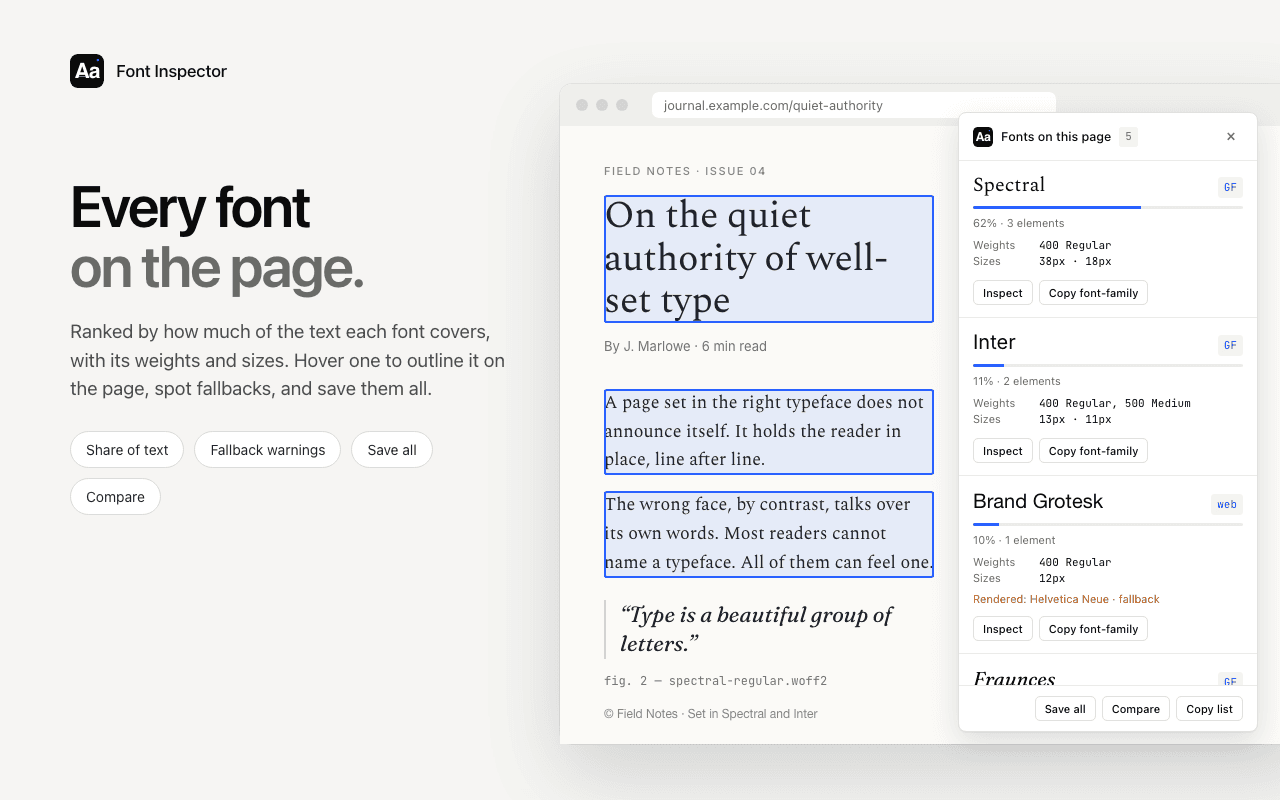
Check more than the home page. Audit one page of each template: an article, a product or pricing page, a form, the footer. The guide to seeing every font on a page covers the panel in detail, and the website font checker gives a quick first look at a URL without installing anything.
Audit first, tokenize second.
Font Inspector lists every family, weight and size a page uses, saves them to a local library, and exports the result as CSS variables or design tokens. Free, no account.
Step 2: consolidate near-duplicates into a scale
Your audit will contain values that are obviously the same decision made twice. 15px and 16px body text. Weights 500 and 600 used interchangeably for emphasis. Line heights of 1.5, 1.55 and 1.6. The job now is to merge them.
- Sort the sizes from small to large and mark how much text uses each. The heavily used values are your anchors.
- Merge any two sizes that sit within a pixel or two of each other, unless they serve clearly different roles.
- Compare what is left with a modular scale. Pick a base, usually the body size, and a ratio, then see which audited sizes land near the steps. The type scale calculator makes this a thirty-second experiment.
- Snap the survivors to the scale. Aim for six to eight sizes in total.
- Do the same for weights and line heights. Most interfaces need a regular, one emphasis weight and one heading weight, plus a tight line height for headings and a relaxed one for body text.
Expect small visual changes when you snap values. That is the point: fewer, more deliberate steps. The reasoning behind ratios and steps is in how to build a typography scale. If you store sizes in rem, the px to rem converter saves arithmetic, and rem vs em vs px explains why rem is the usual choice for font sizes.
Step 3: name them in two layers
Naming is where token systems succeed or fail. The pattern that holds up is two layers.
- Primitive tokens describe the raw options and say nothing about use:
font.size.300,font.weight.semibold,font.family.serif. This is your palette. - Semantic tokens describe a role and point at a primitive:
text.body.size,text.heading.weight. Components use only these.
The split pays off on the day the design changes. If body text moves up one step, you repoint one semantic token and leave everything else alone. A few naming habits help:
- Use a numeric or t-shirt scale for primitives (
100to900, orsm,md,lg). Leave gaps so you can add a step later. - Never put the value in the name.
font-size-18becomes a lie the first time it changes. - Name semantic tokens after the role, not the element.
text.captionsurvives a markup change.text.figcaptiondoes not.
Step 4: write them as CSS custom properties
For many projects, CSS custom properties are the whole token system. They need no build step and every browser understands them.
:root {
  /* Primitives */
  --font-family-sans: "Inter", system-ui, sans-serif;
  --font-family-serif: "Source Serif 4", Georgia, serif;

  --font-size-100: 0.8rem;   /* 12.8px */
  --font-size-200: 1rem;     /* 16px */
  --font-size-300: 1.25rem;  /* 20px */
  --font-size-400: 1.563rem; /* 25px */
  --font-size-500: 1.953rem; /* 31px */
  --font-size-600: 2.441rem; /* 39px */

  --font-weight-regular: 400;
  --font-weight-semibold: 600;
  --font-weight-bold: 700;

  --line-height-tight: 1.15;
  --line-height-normal: 1.6;

  --letter-spacing-tight: -0.02em;
  --letter-spacing-normal: 0;

  /* Semantic */
  --text-body-family: var(--font-family-serif);
  --text-body-size: var(--font-size-200);
  --text-body-line-height: var(--line-height-normal);
  --text-heading-family: var(--font-family-sans);
  --text-heading-weight: var(--font-weight-bold);
  --text-heading-line-height: var(--line-height-tight);
}

body {
  font-family: var(--text-body-family);
  font-size: var(--text-body-size);
  line-height: var(--text-body-line-height);
}

h1 {
  font-family: var(--text-heading-family);
  font-size: var(--font-size-600);
  font-weight: var(--text-heading-weight);
  line-height: var(--text-heading-line-height);
  letter-spacing: var(--letter-spacing-tight);
}If you inspected a single style you want to reproduce, Font Inspector can copy it as CSS, Tailwind classes or SCSS variables, which is covered in copy typography as CSS or Tailwind. For a whole set, the library exports as CSS variables.
Step 5: the Design Tokens Community Group format
When tokens have to feed more than one platform, or travel between a design tool and code, JSON is the better home. The W3C Design Tokens Community Group publishes a format for exactly this. Its first stable version, 2025.10, was published in October 2025. The essentials:
- A token is an object with a
$value.$typesays what kind of value it is, and$descriptionis optional. Groups are plain nested objects, and a$typeset on a group applies to the tokens inside it. - Typography-related types include
fontFamily(a string or an array of names),fontWeight(a number from 1 to 1000 or a named alias such as"bold"),dimensionandnumber. - A
dimensionis an object with a numericvalueand aunit, and the unit must bepxorrem. It is not a string such as"16px". - The composite
typographytype bundlesfontFamily,fontSize,fontWeight,letterSpacingandlineHeight.lineHeightis a plain number that multiplies the font size. - A reference to another token is written in curly braces:
"{font.size.200}". - Recommended file extensions are
.tokensand.tokens.json.
{
  "font": {
    "family": {
      "$type": "fontFamily",
      "sans": { "$value": ["Inter", "system-ui", "sans-serif"] },
      "serif": { "$value": ["Source Serif 4", "Georgia", "serif"] }
    },
    "size": {
      "$type": "dimension",
      "200": { "$value": { "value": 1, "unit": "rem" } },
      "600": { "$value": { "value": 2.441, "unit": "rem" } }
    },
    "weight": {
      "$type": "fontWeight",
      "regular": { "$value": 400 },
      "bold": { "$value": 700 }
    }
  },
  "text": {
    "body": {
      "$type": "typography",
      "$description": "Long-form reading text",
      "$value": {
        "fontFamily": "{font.family.serif}",
        "fontSize": "{font.size.200}",
        "fontWeight": "{font.weight.regular}",
        "letterSpacing": { "value": 0, "unit": "px" },
        "lineHeight": 1.6
      }
    },
    "heading": {
      "$type": "typography",
      "$value": {
        "fontFamily": "{font.family.sans}",
        "fontSize": "{font.size.600}",
        "fontWeight": "{font.weight.bold}",
        "letterSpacing": { "value": -0.5, "unit": "px" },
        "lineHeight": 1.15
      }
    }
  }
}letter-spacing is usually written in em so that it scales with the text. The token format’s dimension type only allows px and rem, so convert the value for each size, or keep em-based tracking in your CSS layer. The letter spacing converter does the conversion.Step 6: put the tokens to work
A token file earns its keep when tools read it. Style Dictionary is the common open source choice: it takes token files and generates CSS variables, SCSS, JavaScript, iOS and Android resources from the same source, and it supports the Design Tokens Community Group format. Tailwind CSS can consume the result too. In Tailwind 4 the theme is defined with CSS variables inside an @theme block, using namespaces such as --font-* for families, --text-* for sizes, --font-weight-*, --leading-* and --tracking-*, so a generated variables file maps across neatly.
Font Inspector’s library exports as JSON, CSS variables or design tokens. Treat any export as the raw material: it records what the site uses today, duplicates included. The consolidation and naming in steps 2 and 3 are judgment calls that still belong to you. Check the exported file against the format your pipeline expects before wiring it in.
Finally, test the tokens where the audit began. Apply them to each template and look at the pages side by side with the originals. If a page looks worse, you merged two values that were different on purpose. Split them again, give each a semantic name that explains the difference, and move on.
Working in a design tool first? Match the site’s font and text styles in Figma before you turn them into tokens.
Questions & answers
What are typography design tokens?
They are named, reusable values for font family, font size, font weight, line height and letter spacing. Components refer to the names, so a change to one token updates the whole product.
How do I find all the font sizes a website uses?
Inspect each kind of text in the DevTools Computed tab, run a Console script that counts computed styles, or open Fonts on this page in Font Inspector, which lists every family with its weights and sizes.
What is the difference between primitive and semantic tokens?
Primitive tokens name raw values, such as font.size.300. Semantic tokens name a role, such as text.body.size, and point to a primitive. Components should use semantic tokens only.
What does a typography token look like in the W3C design tokens format?
It is an object with $type set to typography and a $value holding fontFamily, fontSize, fontWeight, letterSpacing and lineHeight. Sizes are dimension objects with a value and a unit of px or rem.
Should typography tokens use px or rem?
Use rem for font sizes so text respects the reader’s browser font size setting. The design tokens format accepts both px and rem for dimensions.
Related free tools: Type scale calculator · PX to REM converter · Letter spacing converter
See it on real sites: What font does Tailwind CSS use? · What font does Supabase use? · What font does Next.js use? · What font does Facebook use?
Sources and further reading: Design Tokens Community Group: Design Tokens Format Module 2025.10 · MDN: Using CSS custom properties (variables) · Style Dictionary · Tailwind CSS: Theme variables